Farmstack
- Published on
- Status
- Production
- Role
- Full-stack Developer
- Platform
- Mobile & Web
- Industry
- Agriculture Technology
+2
Live Preview
Project Description
Farmstack is a farm management platform for agricultural outgrower operations. The name is literal — it is built as a stack of modules covering different parts of the relationship between a processor and the smallholder farmers supplying it, each one sitting on the same records rather than beside them in a separate system.
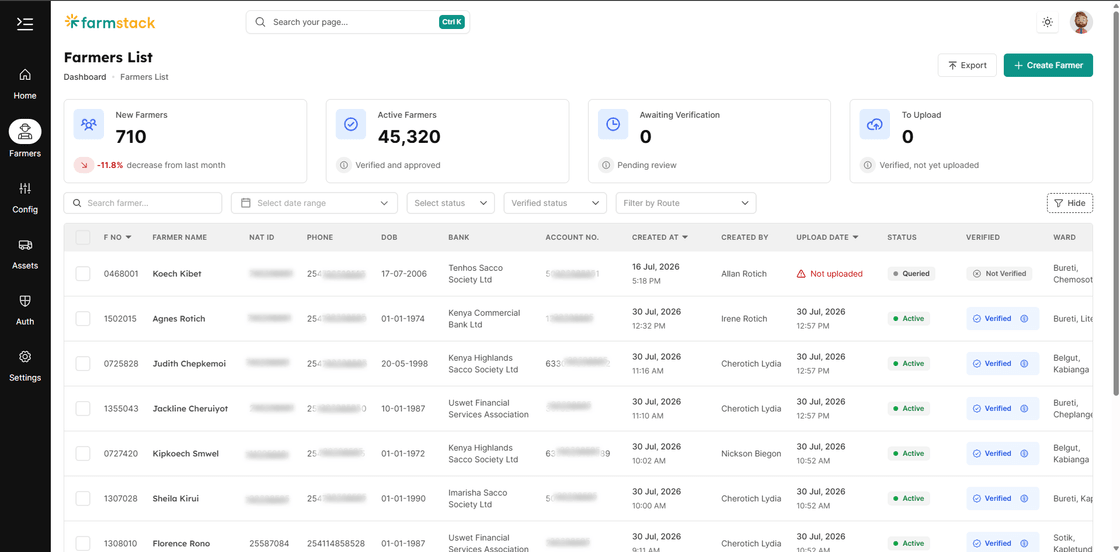
Farmer management came first: recruitment, registration, and the full record of every farmer — their particulars, payment accounts and documents, the route they belong to and the collection station they deliver to. The collection module followed, carrying those same records out into the field for daily weighment capture. Field extension and farm visits are the next module in line, and the architecture is laid out to take them.
The Solution
An outgrower operation runs on two things it usually keeps on paper: who its farmers are, and what they delivered. Registration forms move slowly between the field and the office, records go stale, and by the time a discrepancy surfaces the season has moved on. Farmstack replaces both with one system — but they are very different problems.
Farmer management is a records and governance problem. Thousands of registrations arrive from field officers and each one needs checking before that farmer counts as real, so the platform is built around a verified register with an approval trail rather than a form that writes straight to a table.
Collection is a connectivity problem. It happens at roadside centers where there is often no signal, so the device has to be the source of truth until it can reach the server. It stores every weighment locally, then syncs in both directions once a connection returns.
What holds the modules together is that they share a data model instead of integrating across one. A weighment is only meaningful against an approved farmer on a known route, so a single schema definition generates both the on-device database and the server database, with validation derived from that same schema. Adding the next module means extending that model, not bolting a system onto the side of it.
Farmer Management
Recruitment & Registration
- Field officers register new outgrowers digitally, capturing farmer particulars, payment accounts and supporting documents in place of the paper application. Recruitment is tracked as a pipeline rather than a filing cabinet, with each registration visible from the moment it is submitted.
Farmer Records, Routes & Stations
- The register holds every farmer against the operational structure they sit in — route, collection station and assigned vehicle — so the organisation of the field is data rather than local knowledge. Collection stations are mapped spatially with PostGIS for route planning.
Verification & Approval Workflow
- A two-stage gate between registering a farmer and letting them collect, with separation of duties and a full audit trail behind it. Covered in detail below.
Register Exports
- Data tables export to filter-aware XLSX files served over REST rather than tRPC — binary downloads need a streamed body and a proper filename header, which a JSON transport cannot provide. What you filtered on screen is what lands in the file, and the filename says so.
Collection
Offline-First Collection App
- A React Native (Expo) app that runs the entire collection workflow against an on-device SQLite database. Clerks record weighments, look up farmers and close off batches with no network connection at all, and the app queues everything for sync.
Bidirectional Sync
- Collection data uploads with a per-record sync status — pending, synced or failed — so nothing is silently lost and individual failures can be retried. Reference data flows the other way: farmers, routes, stations and vehicles download on reconnect, so approvals made in the office reach every device in the field.
Field Extension & Visits
The next module in the stack. Extension officer visits, farm inspections and advisory activity recorded against the same farmer record the other modules already share — closing the loop between what a farmer is registered as growing and what is actually happening on their land.
Verification & Approval Workflow
A farmer registered in the field cannot start collecting until two different people have signed off, for two different reasons.
Separation of duties. A field officer registers a farmer as pending. A verifier then checks that the data is accurate and complete, and only an admin makes the business decision to let them in. These are separate permissions — verification is granted broadly, including to field and support staff, while approval is restricted to admin-level roles — so no one both quality-checks and authorises their own submission.
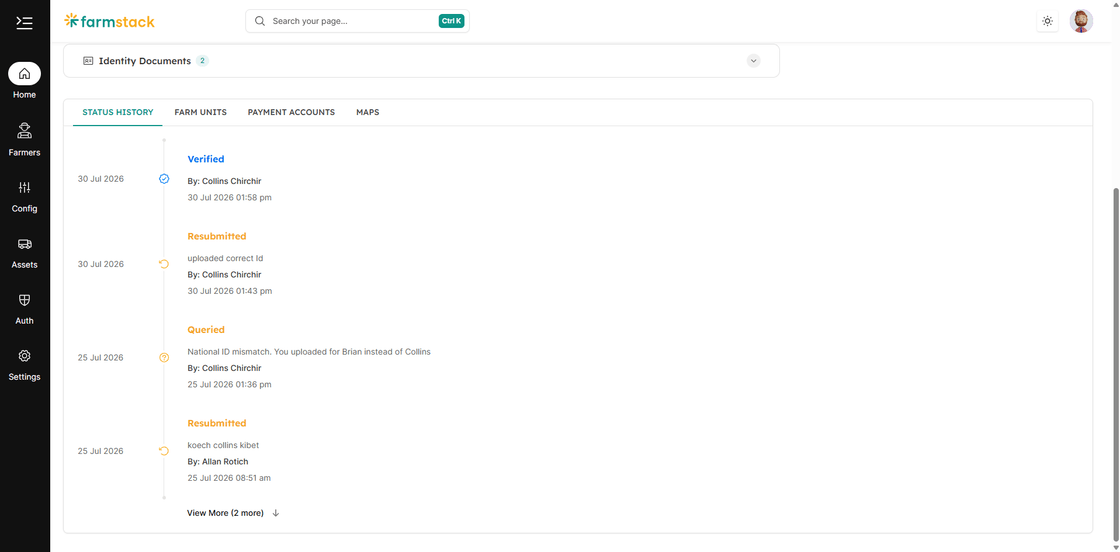
A way back, not just a way out. A verifier who spots a problem does not reject the record. They query it with mandatory notes describing exactly what is wrong, which sends it back to the field officer with the issue attached. The officer corrects the data and resubmits it into the verification queue. Rejection is reserved for the admin's business decline, so a blurry document photo never costs a farmer their application.
The gate is enforced on the server. Approval is refused outright on an unverified farmer, and every workflow action re-checks the caller's permission in the tRPC mutation before touching anything. The interface hides buttons a user is not entitled to, but that is a convenience — it is never where the rule lives.
Every transition is on the record. Each action writes an immutable status-history row capturing the previous status, the new status, the action type, the acting user, a timestamp and a comment — from creation through verified, queried, resubmitted, approved and rejected. Multi-table changes run inside database transactions, and comments are required on query and rejection, so the audit log can never say what changed without also saying why.
One deliberate asymmetry: on rejection the approval timestamp and approver fields stay empty. A declined application is not an approval event, and the record should not imply otherwise.
Shared Foundations
The parts every module draws on, and the reason a new one can be added without rebuilding the last.
One Schema, Everywhere
- The Drizzle schema is exported as both SQLite (mobile) and PostgreSQL (server), with Zod validators derived from it and shared across mobile, web and API. tRPC carries those types end to end, so a change to the data model surfaces as a compile error rather than a runtime surprise in the field.
Analytics & Reporting
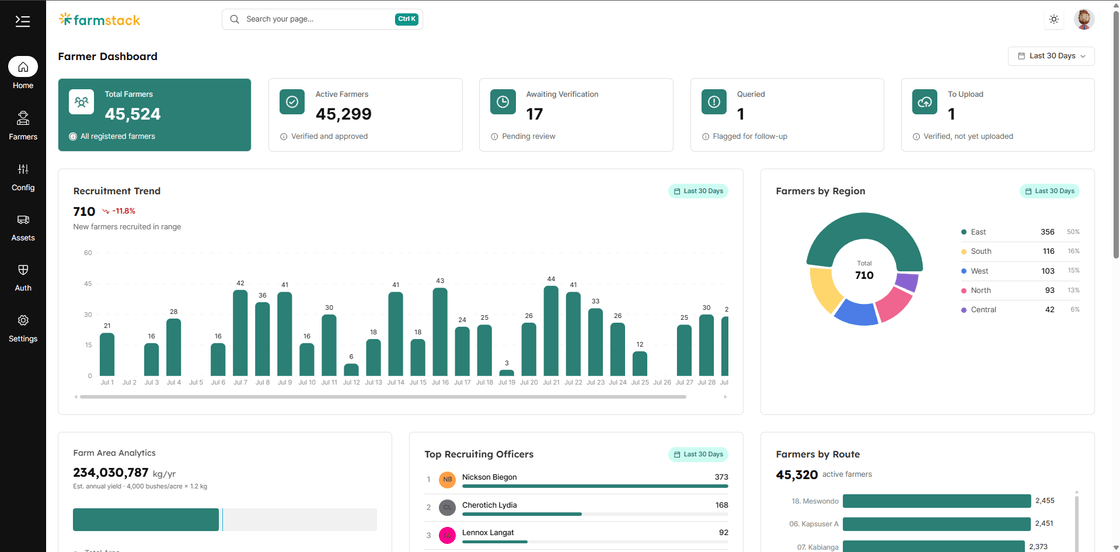
- Dashboards built in React with Recharts covering recruitment trends, collection volumes and route performance, collection stations mapped spatially with PostGIS, and Power BI reports prepared for management review. Each module contributes to the same reporting layer instead of shipping its own.
Background Jobs & Notifications
- Slow and scheduled work runs on a separate worker service built on BullMQ and Redis, with a queue dashboard for visibility. SMS and email notifications retry on their own when a message fails, and a WhatsApp channel is next on the roadmap.
Access Control
- Better Auth with attribute-based permission checks enforced at the API layer, so what a field officer, verifier, admin or support user can do is one set of rules applied across every module rather than per-screen logic.
Technology
- Mobile: React Native, Expo, SQLite (local-first)
- Web: Next.js, React, TypeScript, TanStack Query, TanStack Table, Recharts
- API: Hono and tRPC (migrated from Express), with REST endpoints for device sync, exports and webhooks
- Database: PostgreSQL with PostGIS, Drizzle ORM, Zod validation
- Authentication: Better Auth with attribute-based permission checks
- Background Jobs: BullMQ and Redis on a dedicated worker service
- Storage: Cloudflare R2
- Monorepo: Turborepo, Bun
- Deployment: Docker — the API server and worker run together under Compose since they share a network and Redis instance, while the web client ships as its own image — with automated releases bringing deployments down to four or five minutes